
From
Jan Kittelberger
.svg)
Reading time: 4 minutes
.svg)


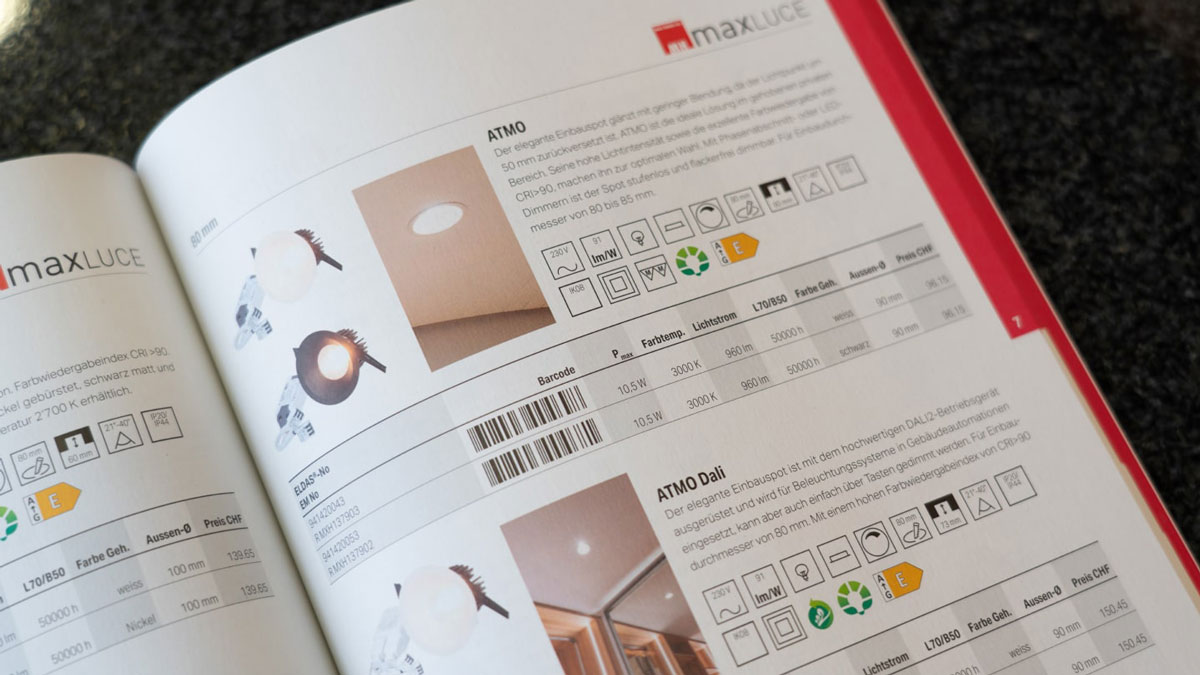
In many B2B companies, the product catalog is still one of the most important sales tools. At the same time, every catalog project is a feat of strength: countless Excel lists, manual copy-paste work in layout files, loops with sales and last-minute corrections just before printing.
The result: high costs, a high risk of errors — and a catalog that is already partly out of date the moment it comes out of the print shop. There is also another way.
Instead of maintaining content directly in the layout program (e.g. InDesign), product data and media are managed centrally in PIM. The layout tool accesses this data and fills pages automatically or semi-automatically.
advantages:
Together with Sales and Marketing, you determine which product groups appear in which order, how deep the hierarchy is (chapters, sub-chapters, product families) and which information should be displayed per product type.
PIM ensures that all relevant attributes are available and maintained. For example, you define:
In the layout program, templates are created for different types of pages: chapter opening, overview pages, table pages, detail pages. These templates contain placeholders for product data, images and texts, which are later filled from the PIM.
The product data is transferred to the layout templates via an interface (e.g. IDML export, plugin or web service). Depending on the level of automation, pages are generated fully automatically or filled semi-automatically with suggestions, which a graphic designer then finalizes.
If product data changes in PIM (e.g. new value, new standard), these changes can be incorporated into existing catalog layouts in a controlled manner. Variants of the catalog can also be created — for example without prices, with a focus on specific product lines, or in other languages.
Table texts and brief descriptions should be standardized. Different spellings or lengths make the layout uneasy and make automation difficult.
Instead of embedding images in layout files, they should be stored in PIM or a connected DAM (Digital Asset Management) and integrated via references. This allows you to keep an overview and share images centrally.
Before you automate the entire catalog, a pilot with one chapter is worthwhile. This allows you to quickly see where data models or layout templates still need to be sharpened.
Catalogs won't disappear in B2B — they'll change. With a PIM-based approach, you can transform the recurring catalog battle into a significantly more efficient, repeatable process. Data quality increases, errors decrease, and your teams have more time for content instead of copy-paste.
Switch to advastamedia now.
.svg)
Tested in numerous projects
Flexible. Well thought out. individual.

Whether it's a website, partner, customer or shop: Your data will be in the right place faster and better.
Ask the AI about advastamedia:


Kittelberger media solutions GmbH
Bayernstraße 8
72768 Reutlingen


.svg)